
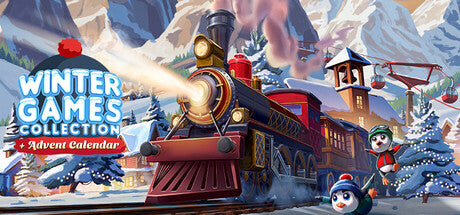
Winter Games Collection Advent Calendar
Rs. 1,208.00Rs. 1,246.57
Delivered by email — usually within seconds of payment
Nothing is shipped. This is a digital code sent to the email address on your order.
Official codes sourced through an authorised distributor.
Prepaid payment only. Cash on delivery is not available for gift cards — there is nothing to deliver, the code is issued the moment payment clears.
Final sale. Once a code is issued it cannot be returned, refunded or replaced — keep the email safe, anyone with the code can redeem it.
Details
Winter Games Collection Advent Calendar Start your Winter Games adventures and punch your ticket for the train. Embark on a magical train ride and discover and play 25 fun games like Snowdrift Racers and Penguin Parade. Discover the Winter Valley Hop aboard the train on a ride through the Winter Valley. Winter Games Collection + Advent Calendar offers two fun modes! Unlock all games at once in the Winter Games mode or reveal one each day with the Advent Calendar mode. Stop at each winter station for a new exciting game. Meet cheerful characters like Flurry the Fox and Princess Glacielle as you explore the valley. Play solo or with friends Play solo or with friends or family and see who will become the winter champion. Try your best in Crate Stacker and Penguin Parade and get a high score. Does someone think they can beat your score Just hand the controller over to your friend and go headtohead in all the minigames. The race to the top of the leaderboard will surely heat up the cold days of winter. Winter Games Collection + Advent Calendar offers multiplayer fun during the cold but cozy winter days. Winter Games Collection Advent Calendar offers 25 challenging games many of which you can play with multiple players for endless fun! 10 adorable funny characters and play with up to 4 players in multiplayer Unlock all games at once in Winter Games mode or reveal one each day with the Advent Calendar mode. Play from the first of December up to Christmas for the best advent experience! ALL YOUR FAVORITE GAMES PACKED IN ONE TRAIN Snowdrift Racers Bobsleigh Relay Snowball Blast Whack a Yeti Fishy Feast Penguin Parade Curling Pizza Slicer Match 3 Tetrice And many more!
How to redeem
How to Redeem Your Game on Steam Open Steam Launch Steam and sign in to your account. Add Your Game Click '+ Add a Game' in the bottom-left corner of the Steam window. Activate a Product Select 'Activate a Product on Steam' and follow the on-screen prompts. Enter Your Product Code When prompted, enter the key you received. Valid formats include: AAAAA-BBBBB-CCCCC AAAAA-BBBBB-CCCCC-DDDDD-EEEEE 237ABCDGHJLPRST Download & Play Once activated, the game will appear in your Library, ready to download and play whenever you like. Important: If you already own the game on Steam, activation will fail. Some Steam keys are region-locked. If you try to activate a key in a country the developer has restricted, you'll see an error - keys can only be activated in the country where they were purchased. How to Activate Your Game on GOG (Keyless Activation) Click 'Activate' You'll find this button in your order confirmation email or on the order details page. The game is added directly to your GOG account, so there's no key to enter. Log in to GOG You'll be redirected to the GOG login page. Already have a GOG account? Enter your email and password, then click 'Login Now'. New to GOG? Click 'Sign Up Now' and follow the steps to create an account. Complete the Activation Once you're logged in, the game will be added to your GOG library automatically. Download & Play Follow the on-screen instructions in your GOG account to download and install the game. Have fun! Important: If you already own the game on GOG, activation will fail. Keyless games can only be activated in the country where they were purchased. If you try to activate one in a region the developer has restricted, you'll see an error.
Terms & conditions
Minimum: Requires a 64-bit processor and operating system OS: Windows 10 or higher Processor: 1 GHz or faster Memory: 8 GB RAM Graphics: Intel (R) UHD Graphics 630 or higher DirectX: Version 11 Storage: 6 GB available space